Website goal
The purpose of this website is to bring together some shared information in one place.
Blog (soon) : Blog about random subject.
Gaming : Guides on various games.
Software : Various information about software.
How the website work
0. Blueprint version
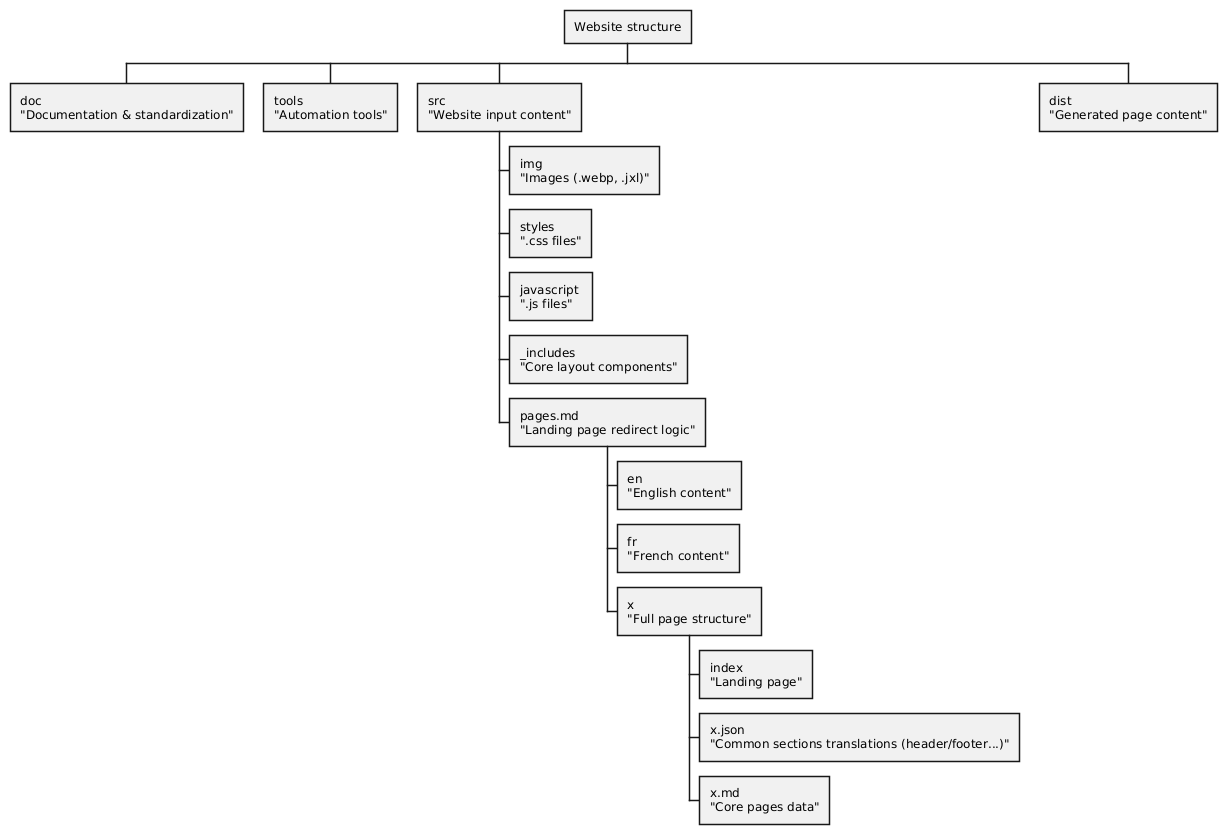
1. Multilingual translation
1.1 Page content
These are generated automatically from Markdown files.
French pages are in the fr folder and English pages are in en.
The structure is:
src/
└── pages/
    ├── fr/
    │   └── *markdown*.md
    └── en/
        └── *markdown*.md
1.2 Shared pages
Shared data is located in a .json file in the language folder.
fr/
└── fr.json
en/
└── en.json
For these pages, the name (the variable) is identical, but only the value differs.
For example, the en.json folder contains: {"Language": "en"}
And the fr.json folder contains: {"Language": "fr"}
All you need to do is enter the name to find out which language you are in. We can therefore see that we are currently on the “en” page.
1.3 Action to change pages
Thanks to this structure, changing pages is as simple as modifying the part of the site's URL that specifies the language
“fr” <---> “en”.
2. Page generation
The data for a page is located in its language folder “fr” / “en”.
The structure is stored in a shared file. To display a specific page “type,” simply call it up. This prevents duplication.
If there is a problem or an improvement can be made, a single modification will affect the entire site.
For example, the navigation page at the top of the site “header” is located in “_includes/layouts/components/header.njk”.
To do this, the language used is Nunjunks (open in a new page)
3. Dark/Light mode
This change is easily made using DaisyUI (CSS framework).
To keep the current mode and avoid constantly reverting to the default mode when changing pages, the setting is saved using JavaScript.
When a mode change is made, this value is saved locally in the browser.